
Build a Puppy Application Template in Seconds
Last Reviewed: May 17, 2026. Built and reviewed by the BreederHQ Operations Team, working with active dog breeders. Template builder only. No data collected.
Pick the screening sections you want. The generator builds a structured puppy application template with section headings and ready-to-use questions you can copy into Google Forms, Typeform, a Word doc, an email, or your own website. The goal is screening for fit, not gatekeeping. This is a planning template, not a guarantee of buyer quality.
Generated Application Template
Copy the text below into your form tool, email, or website. Edit freely to match your voice.
Toggle at least one section above to generate the template.
Build the full application, waitlist, buyer communication, deposits, and placement workflow inside BreederHQ. Intake responses land tied to the right litter and program, waitlist movement is tracked, deposits and contracts live alongside the buyer record, and nothing falls through email threads.
How to Use This Builder
- 1Toggle the sections you want. Most breeders use 6 to 8 of the 10 sections. Skip what is not relevant to your program. Add the program or breed name if you run multiple programs.
- 2Review the generated template. Edit the wording to match your voice. The questions are starting points, not commandments. Cut anything that does not earn its place.
- 3Copy it into your form tool. Google Forms, Typeform, a Word doc, your website, or BreederHQ. The builder generates the questions. You decide where buyers actually submit them.
- 4Pair it with a real conversation. A written application screens for the obvious mismatches. A 20-minute phone or video call screens for everything that matters more.
Want These as Reusable Templates Tied to Your Litters?
This free builder is a starting point. Pick sections, copy the questions, paste them into Google Forms or a Word doc, and you have an application. That works fine for the planning step.
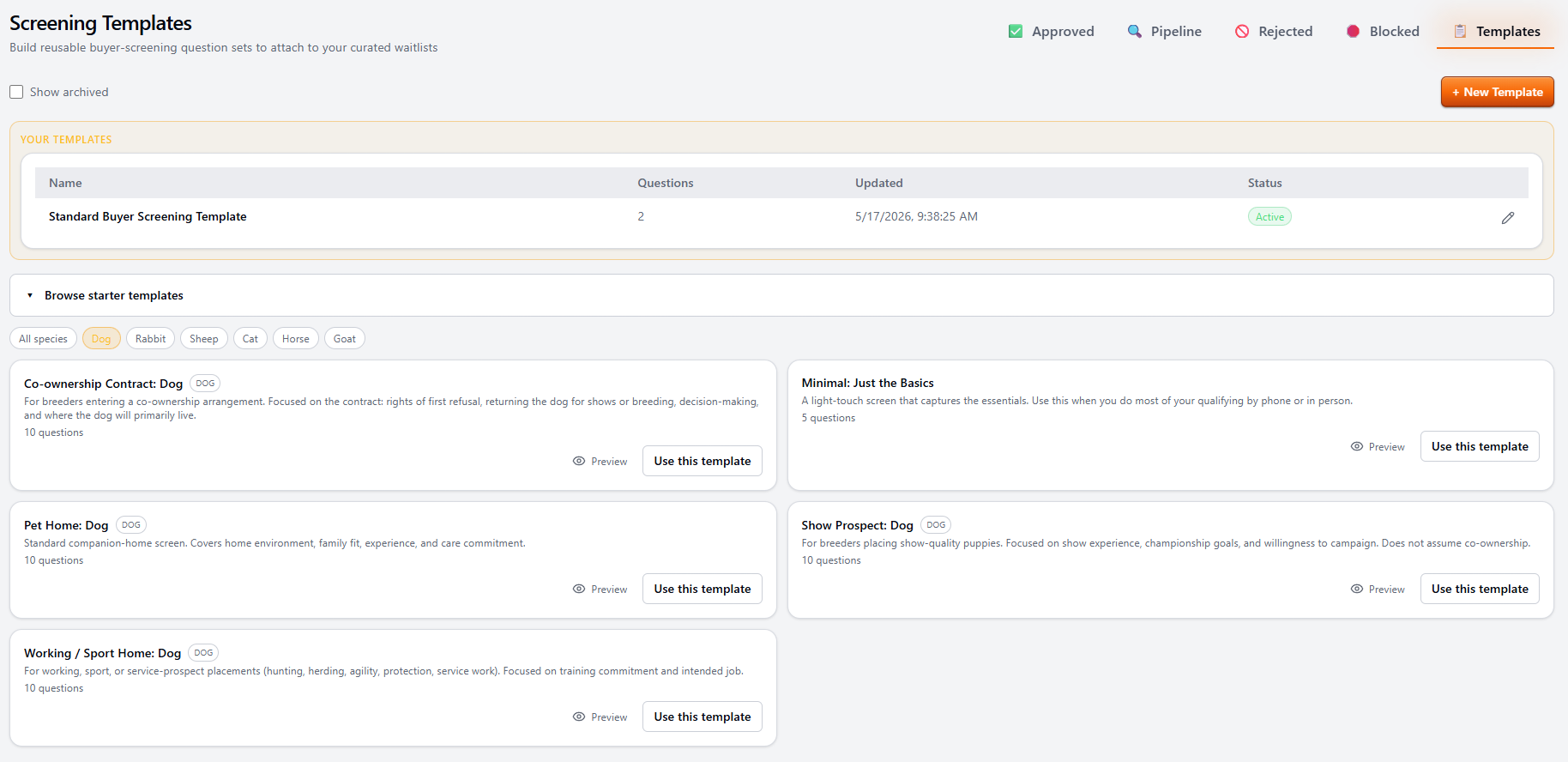
Inside BreederHQ, the same idea is built out as Screening Templates. Start from a typed starter (Pet Home, Show Prospect, Working/Sport Home, Co-ownership Contract, Minimal), fork it, or build your own from scratch. Save the template, attach it to a litter or future-litter pool, and every applicant for that litter gets screened against the same questions. Responses land tied to the litter, the program, and the buyer record without rekeying anything.
What This Free Builder Does
- •Generates question text you can paste anywhere
- •Lets you toggle the sections that match how you screen
- •Works offline in your browser, no signup, no data stored
- •Great for planning the screen before you commit to a tool
What Screening Templates in BreederHQ Add
- •Reusable templates saved per program, not retyped per litter
- •Starter library by species and placement type
- •Attach the right template to a specific litter or waitlist
- •Responses tied to the buyer, the litter, and the deposit
- •Edit anytime; submitted applications keep their original version
Read more about the full intake-to-placement workflow on the Puppy Application Management page.
What Each Section Covers
Household Basics
Who lives in the home, ages of household members, rent or own, how long at the current address. The point is context, not means testing. A puppy joining a stable household with one or two adults is different from one joining a household with five kids under ten, and both can be great placements.
Experience with Dogs
Past and current dogs, breeds owned, what happened to previous dogs. First-time owners are not disqualified. Buyers who lost three dogs in a row to preventable causes are a different conversation.
Breed Fit
Why this breed, what they expect from the breed, what research they have done. Buyers who picked the breed off a movie or because it looked cute on Instagram are not bad people, but they need more education before a placement makes sense.
Lifestyle and Schedule
Hours the puppy will be alone, work-from-home vs. office, travel frequency, who covers care during travel. This is usually where breed-fit problems show up. A high-drive working line and a 60-hour office week do not pair well.
Housing and Yard Setup
House or apartment, yard or no yard, fence type and height, landlord approval if renting. Some breeds genuinely need fenced space. Others do not. Be honest with yourself about what your line actually needs.
Children and Other Pets
Ages of children, other dogs or cats in the home, plans for socialization and introductions. This is fit information, not approval information. A litter raised in a chaotic family home may be the perfect placement for a chaotic family home.
Training Expectations
Plans for puppy class, crate training, house training, what training approach the buyer expects to use. Buyers who plan to send the puppy to a board-and-train at four months for everything tend to set themselves up poorly.
Vet Reference
Current or planned vet, permission to call. Most breeders skip this for first-time owners and use it for buyers with a stated dog history.
Placement Preferences
Sex preference, color preference, companion vs. working vs. sport, willingness to be flexible. This is where breeders learn whether a buyer is anchored to one specific puppy or genuinely fit for the litter.
Contract and Deposit Acknowledgement
Confirmation that the buyer has read the contract terms, understands the deposit policy, and accepts the spay/neuter and return-to-breeder clauses. This is a yes/no acknowledgement, not the contract itself. See Puppy Deposit Refund Rules by State for context on what to put in your deposit clause.
Screening for Fit, Not Gatekeeping
The best applications read like a breeder trying to find the right home for each puppy, not like a court interrogation. Buyers can tell the difference. Buyers who feel judged tend to either ghost or perform. Neither helps you place puppies well.
Skip questions you would not act on. If a no answer to a question would not change your decision, the question is noise. Cut it. The shorter the application, the more honest the responses tend to be.
Read more in Puppy Application Management and the Dog Breeding Software overview.
Frequently Asked Questions
What is a puppy application?
A puppy application is a short questionnaire a breeder asks an interested buyer to complete before approving them for a litter, deposit, or waitlist spot. It is a screening conversation in written form. Good applications cover household basics, experience with dogs, lifestyle, housing, training expectations, and how the buyer plans to handle the practical realities of raising a puppy. The goal is to gather enough context to decide whether a placement is a good fit for both the buyer and the puppy.
Is this builder an actual application form I can collect responses with?
No. This is a template builder. It generates the question text you want to ask. It does not collect responses, does not store buyer data, and does not have a backend. Use the copy button to drop the generated template into Google Forms, Typeform, a Word doc, an email, or your own website, then collect responses there. If you want application intake, waitlist management, deposit tracking, and buyer communication in one place with responses tied to the right litter and program, that is what BreederHQ does.
What sections should a puppy application include?
Most breeders cover ten core areas: household basics (who lives in the home), experience with dogs, breed fit (whether the buyer understands the breed they are asking about), lifestyle and schedule, housing and yard setup, children and other pets, training expectations, a vet reference, placement preferences (sex, color, working vs. companion), and a contract and deposit acknowledgement. You will not need every section for every program. Toggle the sections that match how you screen and the generator will build a template you can send.
Do these questions guarantee buyer quality?
No. A written application is one data point in a screening conversation, not a guarantee. The strongest screens combine a written application with a phone or video call, a reference check, and time. Breeders who lean on the application alone tend to get burned by buyers who knew what answer they were supposed to give. Use this template as the starting point of a conversation, not the entire decision.
How long should a puppy application be?
Long enough to learn what you need, short enough that serious buyers will actually complete it. Most well-run breeders land somewhere between 15 and 30 questions. The exact length depends on how much of the screening you do in writing vs. on a follow-up call. If a buyer ghosts after seeing the application, that is usually information, not a problem with the application length.
Should I ask for sensitive information like income or home value?
Most breeders avoid direct income or home value questions. They tend to make buyers defensive and the answers are not reliable. Better proxies are lifestyle questions (work schedule, time spent at home, who covers care during travel), housing questions (rent vs. own, landlord approval if renting, fence type), and a frank conversation about expected costs of food, vet care, training, and emergencies. The point is fit, not means testing.
Do I need a separate application per program or breed?
Often yes, especially if you run multiple programs with different temperaments, working requirements, or buyer profiles (e.g., a sport line vs. a companion line). The shared sections (household, lifestyle, housing, vet reference) usually carry over, but the breed fit and placement preference sections should be specific to each program. Build one template per program and reuse the shared sections.
Where do my buyers actually fill this out?
Wherever you collect form responses today. Google Forms and Typeform are common free options. Some breeders embed the application on their own website. Others send it as a PDF or Word doc and accept responses by email. This builder generates the question text. You decide where to host it. If you want intake, waitlist, deposits, contracts, and buyer comms in one workflow tied to the right litter, that is what BreederHQ is built for.