
Puppy Application Management That Doesn't Live in Your Inbox
Last Reviewed: May 16, 2026. Written and reviewed by the BreederHQ Operations Team, working with active dog breeders running real waitlists and puppy placements.
The buyer pipeline is the part of a breeding program that feels the most like a business and gets handled the least like one. Heat dates have a system. Pedigrees have a system. Applications usually have a Google Form, a label in Gmail, a tab in a spreadsheet, and a memory of who already paid.
That works until it doesn't. The litter where you accidentally took two deposits on one puppy. The waitlist where you can't remember whether the buyer at the top is still active. The contract that the buyer is asking for and you can't find. The deposit Venmo from "Aunt Sarah" that you're ninety percent sure was for the May litter but might have been for the September one.
Where Application Management Falls Apart
The failure modes are predictable:
- •Applications sit in a Gmail label and the third-most-promising buyer goes a week without a reply
- •The Google Form spreadsheet has 47 entries and no way to mark which ones you've replied to
- •The waitlist is a piece of paper that hasn't been updated since two buyers backed out
- •Deposits arrive through three payment apps and a personal check
- •Contracts are emailed back and forth as Word attachments, signed with a phone-photo of an actual signature
- •The "approved" list and the "deposited" list and the "matched to a puppy" list are three different documents that have to be reconciled by hand
- •A returning buyer asks "do you still have my application from last year?" and the honest answer is no
The buyers see this. Buyers who get a slow, disorganized intake experience compare it against the breeders who don't and draw their own conclusions.
The Five-Tool Application Stack
A Google Form for Applications
Easy to set up. No status field. No way to track approval. Each application becomes a row in a spreadsheet you forget to check.
Gmail Labels for Tracking
"Waitlist 2026," "Approved," "Pending." Manual labeling. Search-dependent. Becomes unusable around year three when the same buyer has six threads across two litters.
A Waitlist Document
Word document or Google Doc with names in order. Updated when you remember. Never quite matches the spreadsheet.
Stripe, PayPal, Venmo, or Personal Checks for Deposits
Whoever is easiest for the buyer. Money arrives, you write it down somewhere. Reconciling at year-end is a project.
A Word Doc Contract Sent by Email
Sent as an attachment. Buyer prints, signs, photographs, sends back. Signature is half-readable. Storage is "in that folder somewhere."
Why the Five-Tool Stack Doesn't Scale
The Tools Don't Talk
An application in Google Forms doesn't know it became a waitlist entry. The waitlist entry doesn't know a deposit arrived in Venmo. The deposit doesn't know a contract was signed. You are the integration, and you have a life.
Buyers Notice the Delay
Three-day reply times during application season is normal when everything is in your inbox. To the buyer, three days reads as "she's not interested." The buyer who was your second-best applicant moved on by the time you replied.
Position Disputes Become a Thing
"I thought I was third on the waitlist?" If the answer lives in a Word doc you update by hand, you can't prove otherwise. If position is visible in a portal, the conversation doesn't happen.
Returning Buyers Get Treated Like Strangers
The family that took a puppy in 2023 and wants another in 2026 has to fill out the whole application again. You don't remember the relationship. Their puppy's littermates are unfindable in the system.
Year-End Reconciliation Is a Nightmare
Tax time, the buyer asks for a receipt, the contract dispute lands. The records you need exist across five tools and three years. Producing the answer takes hours.
What Proper Application Management Requires
One Application, One Inbox
- •Application questions you control
- •Required vs. optional fields
- •Submissions arrive in one place, not a spreadsheet
- •Each submission has a status: new, reviewing, approved, declined, on waitlist
A Waitlist That Updates Itself
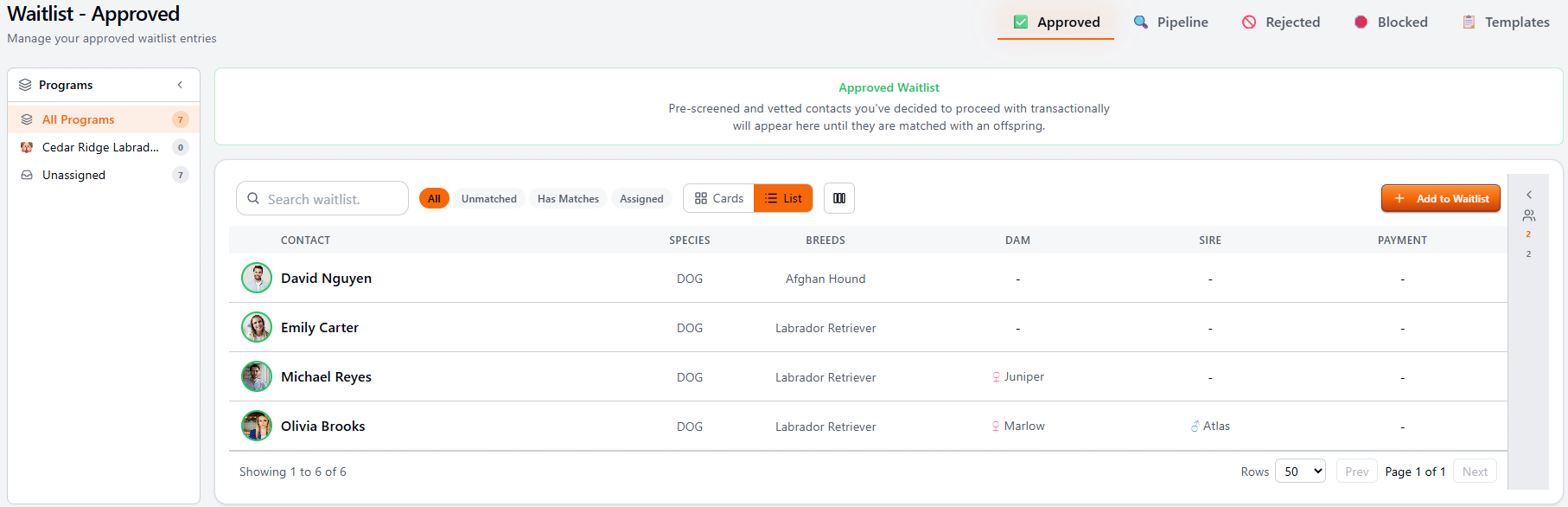
- •Approved applicants move onto the waitlist automatically
- •Position is visible to the buyer in the portal
- •Tied to a specific litter or a future-litter pool
- •Drops and skips are recorded with reasons
Deposits That Belong to a Litter
- •Invoiced through the portal
- •Paid through Stripe, no manual reconciliation
- •Tied to the specific litter, not floating in a generic ledger
- •Refunds clean and auditable
Contracts In, Not Attached
- •Your contract template, uploaded once
- •Signed in the portal with an audit trail
- •Signed copy stores against buyer, puppy, and litter
- •Searchable years later
A Real Buyer History
- •Every application this buyer has ever submitted
- •Every puppy they've taken
- •Every contract they've signed
- •Every payment they've made
How BreederHQ Handles Puppy Applications
One application link, one inbox, one waitlist per litter or per pool. Applications arrive with status, you approve or decline in one click, approved applicants move to the waitlist automatically with visible position. Deposits invoice through the portal and run through Stripe. Contracts are signed in the portal and stored against the buyer, the puppy, and the litter.
When the puppies are old enough to evaluate, you match approved buyers to specific puppies and the buyer sees their puppy in the portal. The contract goes out, the balance invoice goes out, the buyer pays, you mark the puppy placed. Records persist for warranty conversations, returning-buyer conversations, and tax records.
The buyer never has to install anything. You never have to reconcile across five tools.
Screening Templates: Help Picking the Right Questions
Most breeders already know they want to screen buyers. The harder part is figuring out which questions actually earn their place on the application. A Pet Home placement asks different questions than a Show Prospect, and a Co-ownership Contract asks different questions than either. The same buyer can be a great fit for one program and a hard pass for another, and the application needs to reflect that.
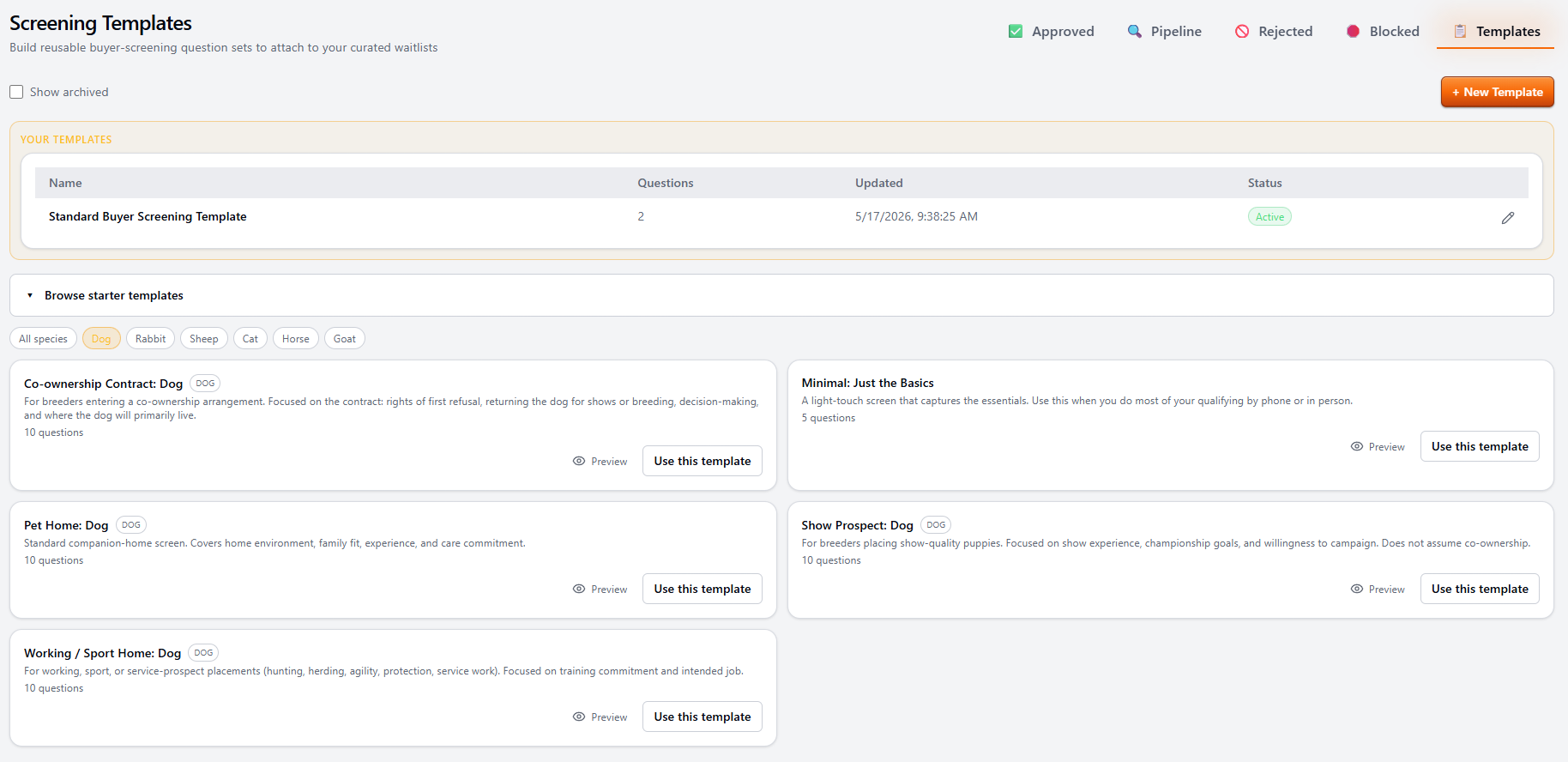
BreederHQ ships starter screening templates you can use as-is, fork into your own version, or ignore entirely and build from scratch. Templates are reusable. Attach the right one to a litter, a waitlist, or a future-litter pool and every applicant gets the same screen.
Starter Templates by Placement Type
Each starter is written for a specific kind of placement, not a generic catch-all. Filter by species, preview the questions, then either use it as-is or use it as a starting point for your own.
- •Minimal: Just the Basics. Light-touch screen for breeders who do most of their qualifying by phone or in person.
- •Pet Home. Companion-home screen covering household, family fit, experience, and long-term care commitment.
- •Show Prospect. For show-quality placements. Show experience, championship goals, willingness to campaign.
- •Working / Sport Home. Training commitment, intended job (hunting, herding, agility, protection, service).
- •Co-ownership Contract. Rights of first refusal, returning the dog for shows or breeding, where the dog primarily lives.
Your Own Templates, Reused Across Programs
Once you've tuned a screen, save it. Use it on every litter under that program. Tweak it without rewriting from scratch. Attach different templates to different waitlists or pools when the placement type changes.
- •Reusable across litters and future-litter pools
- •One template per program, not one per litter
- •Edit anytime; in-flight applications keep the version they were submitted against
- •Archive old templates without losing the historical answers
- •Free planning tool too: the puppy application builder generates question text you can use anywhere
Who This Workflow Is For
- •Breeders running an application process for each litter
- •Breeders with active waitlists
- •Breeders taking deposits
- •Breeders with returning buyers across multiple litters
- •Breeders who want buyers to self-serve their status instead of emailing for updates
- •Breeders who want a real audit trail when a contract dispute or warranty claim shows up
Who Probably Doesn't Need This
- •Breeders who place puppies only to family and close friends
- •Programs that don't use applications or waitlists
- •Anyone whose current process never drops a deposit, never loses a contract, never misses an email
That last case is rarer than breeders realize. The system you have works until the day it doesn't.
Frequently Asked Questions
Do buyers have to create an account to apply?
They get a buyer profile, but they don't need to install anything or remember a password. The application link emails them a magic link to come back to their submission, their waitlist position, and (later) the puppy you matched them with.
Can I keep my existing application questions?
Yes. The application builder is a question editor, not a fixed form. Move questions you already ask into it, add new ones, mark which are required, and order them however you want. Your application is your application.
What happens to applications I want to decline?
Declined applications are kept with a reason note. They're searchable, and if the applicant comes back next year you have the history. Nobody gets ghosted by accident because the system records the decision and lets you send a polite decline message in one click.
How does the waitlist actually work?
Each approved applicant goes onto a waitlist tied to a specific litter or a future-litter pool. Position is visible to the buyer in the portal. When a litter is born, you can pull from the waitlist in whatever order you use (deposit order, application order, preference match, breeder discretion) and the system records the match.
Does it integrate with payments?
Yes. Deposits and balances go through Stripe in the portal. Money lands in your bank account directly. The deposit is tied to a litter, not floating in a generic Stripe ledger, so refund decisions later are clean.
What about contracts?
Upload your contract template. Buyer signs in the portal. Signed copy stores against the buyer, the puppy, and the litter. No more "I think we still have a copy of the contract somewhere."