One Inbox for All Client Communication.
You already communicate constantly with buyers, waitlist families, past clients, and marketplace inquiries. When those conversations are scattered across email, text, social media, and your website, it is easy for things to fall through the cracks.
The Communications Hub brings everything together in one place. When you're away from your desk, the BreederHQ Mobile Companion app lets you reply on the go so buyers still hear back quickly.
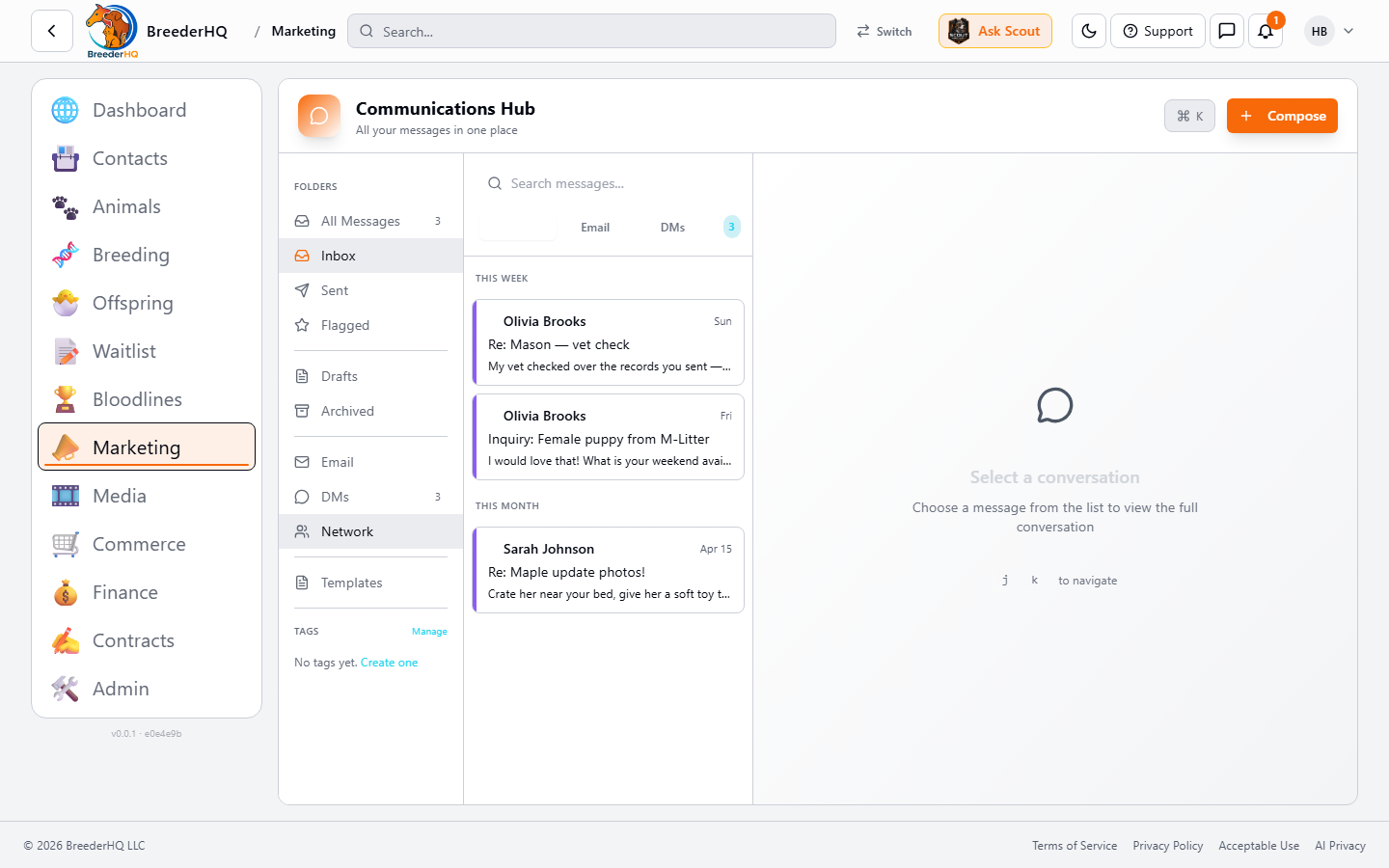
Email, DMs, portal messages, every conversation in one inbox, sorted by week, tagged, and tied to the buyer's record.
You already answer every message. The platforms keep multiplying.
Right now, you probably check:
- •Personal email for client questions
- •Business email for formal inquiries
- •Text messages for quick updates
- •Facebook Messenger for social inquiries
- •Instagram DMs for photo requests
- •Website contact forms
Where it gets complicated:
- •An inquiry sits unanswered because it landed on a platform you weren't actively checking
- •You can't find that conversation from last month
- •You type the same responses over and over
- •Important details get lost across different threads
- •Quick replies get harder to fit in when you are on the move
One unified inbox means the message always comes to you, and the answer is always just a tap away.
Everything in One Place
The Communications Hub is your single dashboard for all client interactions:
Incoming and outgoing emails from your configured email address. Full threading, attachments, and reply-to handling.
💬 Portal Messages
Direct messages from buyers in your client portal. See new messages instantly without refreshing.
🔔 Marketplace Inquiries
Inquiries from potential buyers on the BreederHQ Marketplace flow directly into your hub. No separate inbox to check.
📱 Mobile Companion Access
The unified inbox is also available in the BreederHQ Mobile Companion app for the moments you're away from your desk. Push notifications tell you when a buyer messages, and you can reply with templates and attachments. The companion is built for replies and quick triage; for setting up auto-replies, templates, and rules, use the web app.
🏷️ Smart Organization
Automatic folders: All, Inbox, Sent, Flagged, Drafts, Archived. Filter by channel, search by keyword, or filter by tags.
Stay Up to Date, Wherever You Are
Real-time notifications in the web app and push notifications on the Mobile Companion mean you see new messages the moment they arrive, whether you are at the desk, in the barn, or at a show. Respond right away, or flag it for later.
Save the Replies You Write Every Day
You've already written the perfect "thank you for your interest" reply a hundred times. Templates save your best versions so you can send them with one click, from web or mobile, and still sound like you.
Template Features
- ✓Variable insertion: Templates automatically fill in contact name, animal name, offspring-group name, and other dynamic data
- ✓Categories: Organize templates by type-Email, DM, Social
- ✓Preview mode: See exactly what the message will look like before sending
- ✓Quick access: One-click insertion from the compose window
Example: Inquiry Response
"Hi [contact_name], thank you for your interest in [group_name]! I'd love to tell you more about our program..."
Example: Deposit Confirmation
"Hi [contact_name], I've received your deposit for [animal_name]. Your portal access has been activated..."
Document Bundles: One Click, All the Files
Sending the same set of documents repeatedly? Document bundles let you package files together and attach them all with one click.
Common Bundle Examples
📦 Go-Home Packet
- • Health records
- • Vaccination certificate
- • Feeding instructions
- • Training resources
- • Microchip registration
📋 Application Packet
- • Program overview
- • Pricing information
- • Health testing results
- • Contract sample
- • Waitlist process
Create bundles once, reuse forever. Drag to reorder documents within bundles. Professional, consistent, and fast.
Earn Your Quick Responder Badge
Buyers want responsive breeders. The Quick Responder badge shows on your marketplace profile when you consistently respond quickly, and it is earned automatically, not self-reported. The Mobile Companion app makes it easier to hit that response window even when you are in the barn, at a show, or running errands.
Quick Responder
Responds within 4 hours during business hours
How to earn it:
- • Respond to inquiries within 4 hours during your business hours
- • Maintain this response time across at least 5 inquiries
- • Use the Mobile Companion app to reply on the go, so busy days don't cost you the badge
- • Badge is awarded automatically, no application needed
⏰ Business Hours Configuration
Set your availability schedule so the system knows when to measure response times. Configure:
- • Per-day schedule (15-minute intervals)
- • Timezone selection
- • Different hours for different days
Rule-Based Auto-Replies
Pro & EnterpriseAutomatic responses help you manage high inquiry volumes without sacrificing responsiveness. Auto-replies are included on Pro and Enterprise plans and fully configurable so they sound like you, not a bot.
📨 Instant Acknowledgment
Auto-send a confirmation when someone inquires. "Thanks for reaching out! I'll respond within 24 hours."
🏖️ Away Messages
Traveling or at a show? Set an away message with your return date so inquirers know when to expect a response.
❓ Keyword-Triggered Responses
Detect common questions and send relevant information automatically. A message asking about pricing can receive your current pricing guide without you lifting a finger.
📅 Smart Scheduling
Configure when auto-replies send. Business hours only? Weekends included? You control the rules.
One Inbox, Everywhere You Work.
Web and mobile. Templates and bundles. Quick replies, however you are working today.
Frequently Asked Questions
What channels does the Communications Hub support?
The hub combines email and direct messages (from the client portal and marketplace) into one unified inbox. You see everything in one place instead of checking multiple platforms.
What are document bundles?
Document bundles are pre-packaged sets of documents you send frequently. For example, a "Go-Home Packet" bundle might include health records, vaccination certificates, feeding instructions, and training resources. One click attaches the whole bundle.
How does the Quick Responder badge work?
BreederHQ tracks your response times automatically. If you respond to inquiries within 4 hours during business hours (and have at least 5 responses), you earn the Quick Responder badge. It shows up on your marketplace profile.
Can I respond to messages from my phone?
Yes. The BreederHQ Mobile Companion app — the on-the-go partner to the BreederHQ web app — gives you the same unified inbox in your pocket. Push notifications tell you when a buyer messages, and you can reply with templates and attachments. This makes it much easier to hit the response window for the Quick Responder badge.
Are auto-replies available?
Yes. Rule-based auto-replies are included on Pro and Enterprise plans. Set instant acknowledgments, away messages, keyword-triggered responses, and business-hours scheduling so common questions get answered automatically in your voice.